Does AI Search Actually Drive Leads? The Case for Tracking It
 Breezy Team ·Oct 4, 2026 ·6 MIN READ
 TL;DR: AI search helps turn visitors into leads by removing the steps between a question and its answer. To see it working on your own site, watch which searches land in Product Enquiry and Pricing, check how often visitors click through from answers and sources, point those high-intent answers to a clear next step, close the content gaps buyers run into, and line them up against the enquiries you receive.
If you’re evaluating AI search for your site, you’ve probably already asked yourself the sceptical version of this question: does this actually turn into leads, or is it just a nicer-looking search box? Fair question, and it deserves a straight answer before anything else here.
The case for it
Every extra step between a question and its answer is a chance to lose a visitor. Someone who has to dig through a nav menu, guess the right search term, or give up and go find a competitor’s site instead was further from converting with every extra click. Someone who asks a plain question and gets a direct, sourced answer is closer to acting — not because the answer was persuasive copy, but because nothing stood between them and the information they needed.
This is really the flip side of 5 Website UX Signs You’re Losing Customers Before They Convert. That piece named the friction: empty search results, buried content, visitors who can’t find their way in. This is the payoff side of removing it: the visitors who would’ve quietly left instead get answered and stay in the conversation.
That’s the behavioural case, and it holds on its own. Whether it’s actually happening on your site is the more interesting question — and one worth checking rather than assuming, which is what the rest of this piece is for.
What you can track
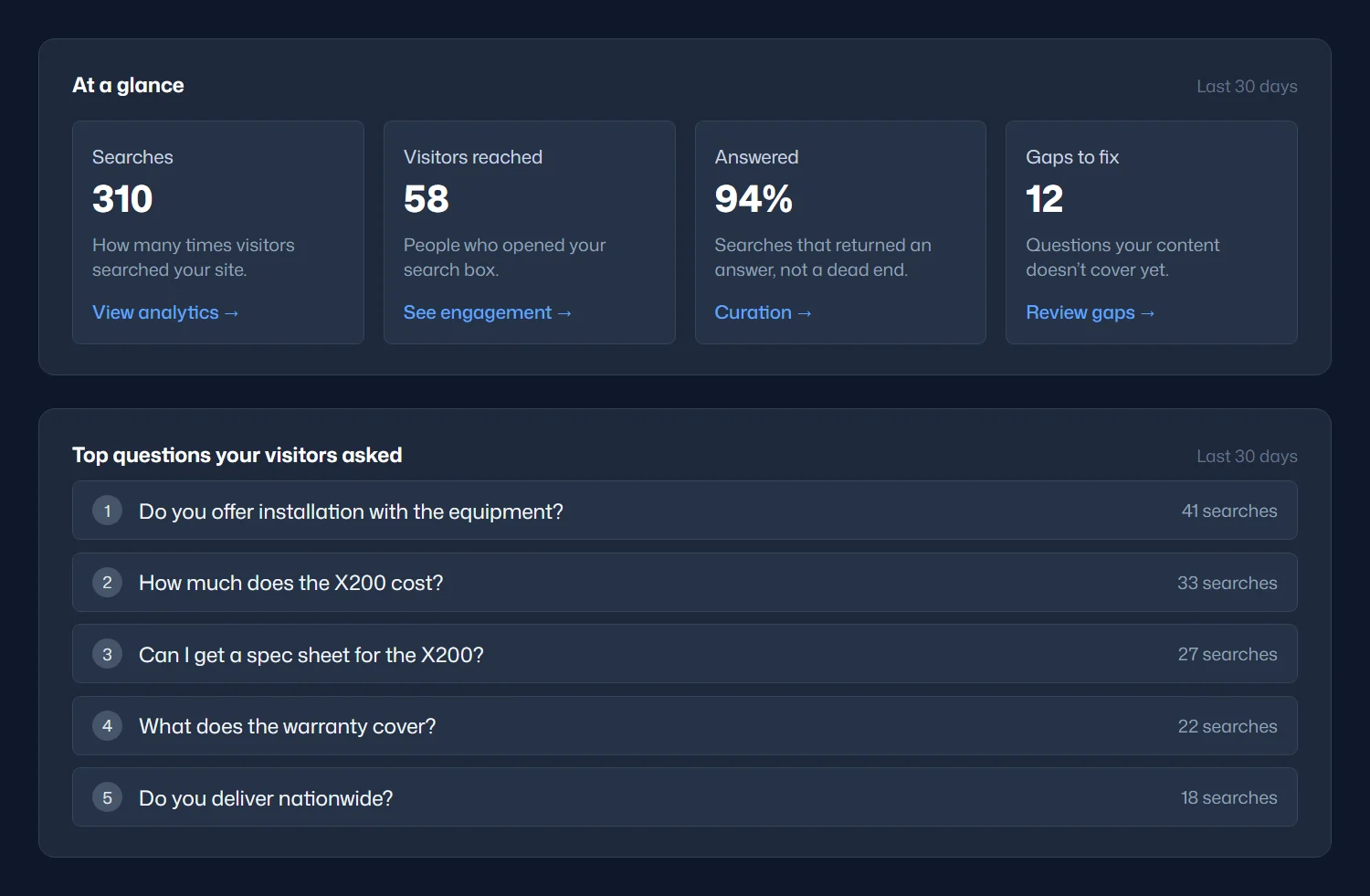
Your leads arrive through your own channels, by email, phone, chat or a form, so the clearest proof on your own site comes from putting your search data next to them. Here’s what to work with:
- Search volume and top questions: whether visitors are using search, whether that’s growing, and what they ask most
- Answered rate: real answers vs. dead ends
- Query categories: every search is automatically sorted into General, Product Enquiry, Support, Navigation or Pricing, so you don’t have to tag commercial intent by hand
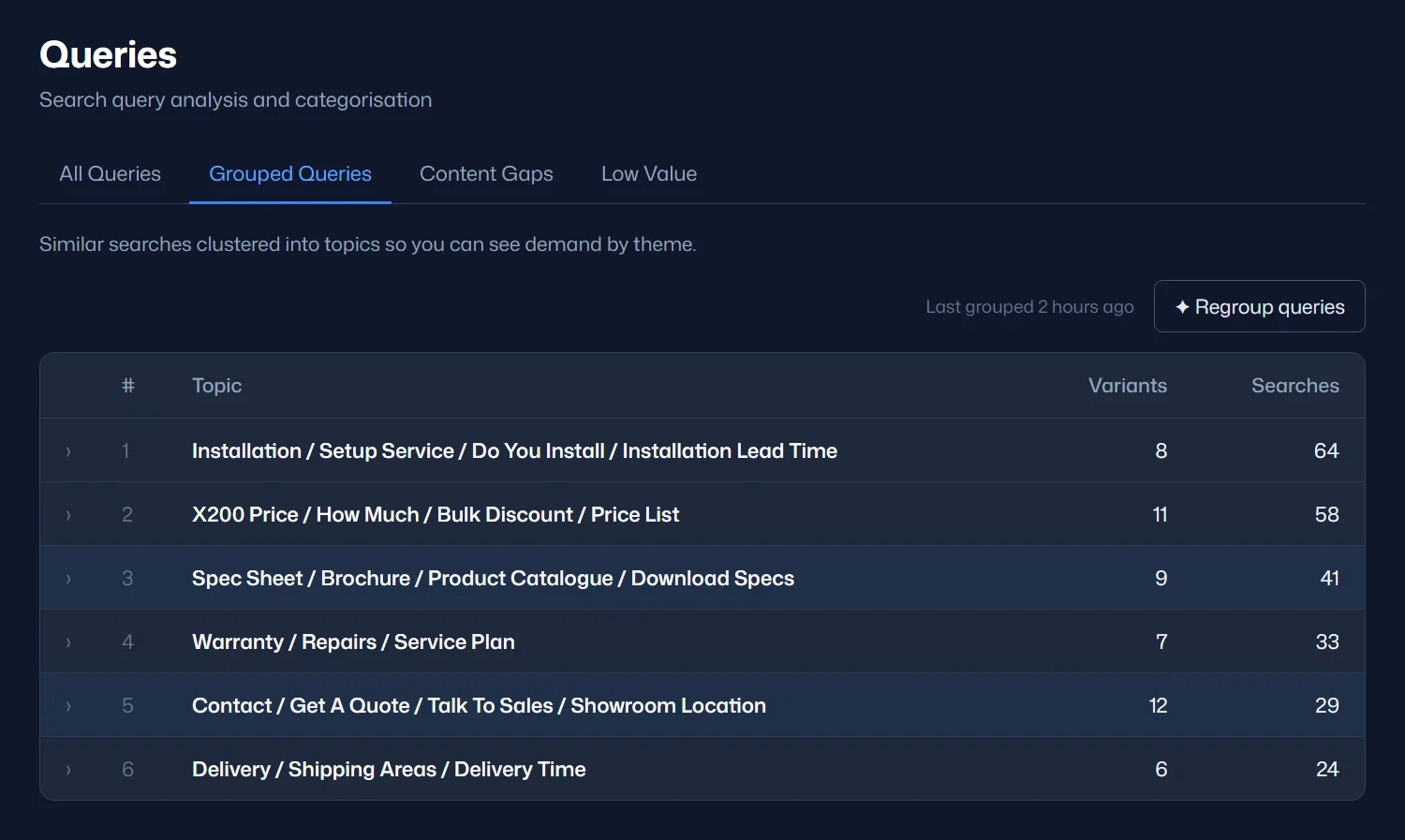
- Grouped topics: similar searches clustered into themes, so you can see demand for things like quotes, brochures or contact details at a glance
- AI Answer and Sources click-through: under Statistics › Widget Engagement, how often visitors click the link in an AI answer or one of its sources for every search they make, a site-wide read on whether visitors act on what they’re told
- Content gaps: the specific questions your site couldn’t yet answer
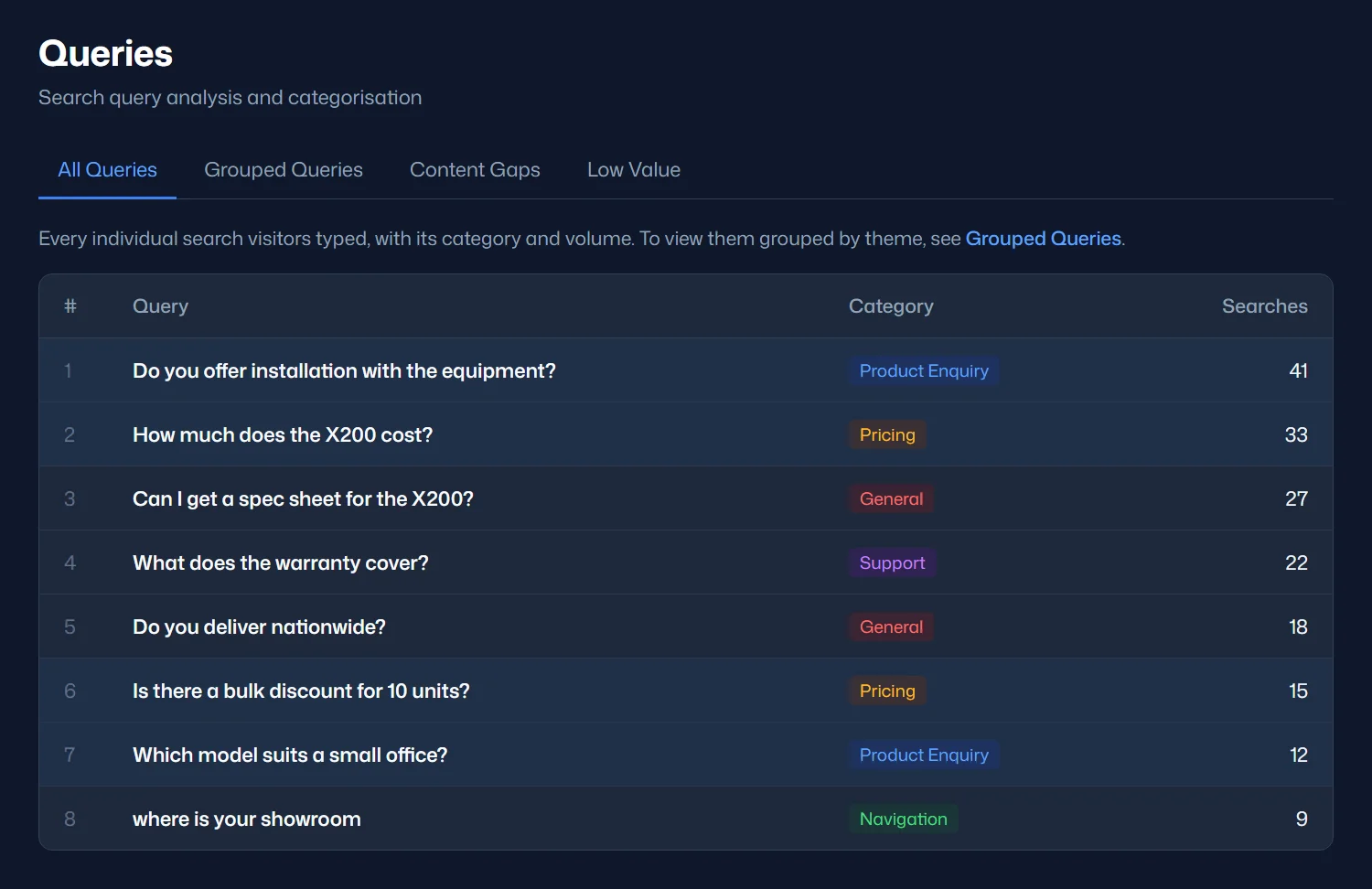
Growing Product Enquiry and Pricing searches, alongside healthy click-through, are the clearest sign here that visitors are being nudged toward acting, short of asking them directly. Categories give you the first cut. The top questions and grouped topics fill in the rest: a request for a spec sheet or a brochure reads like a general question, but it usually comes from someone close to buying.
A lever you can pull directly: curated AI instructions
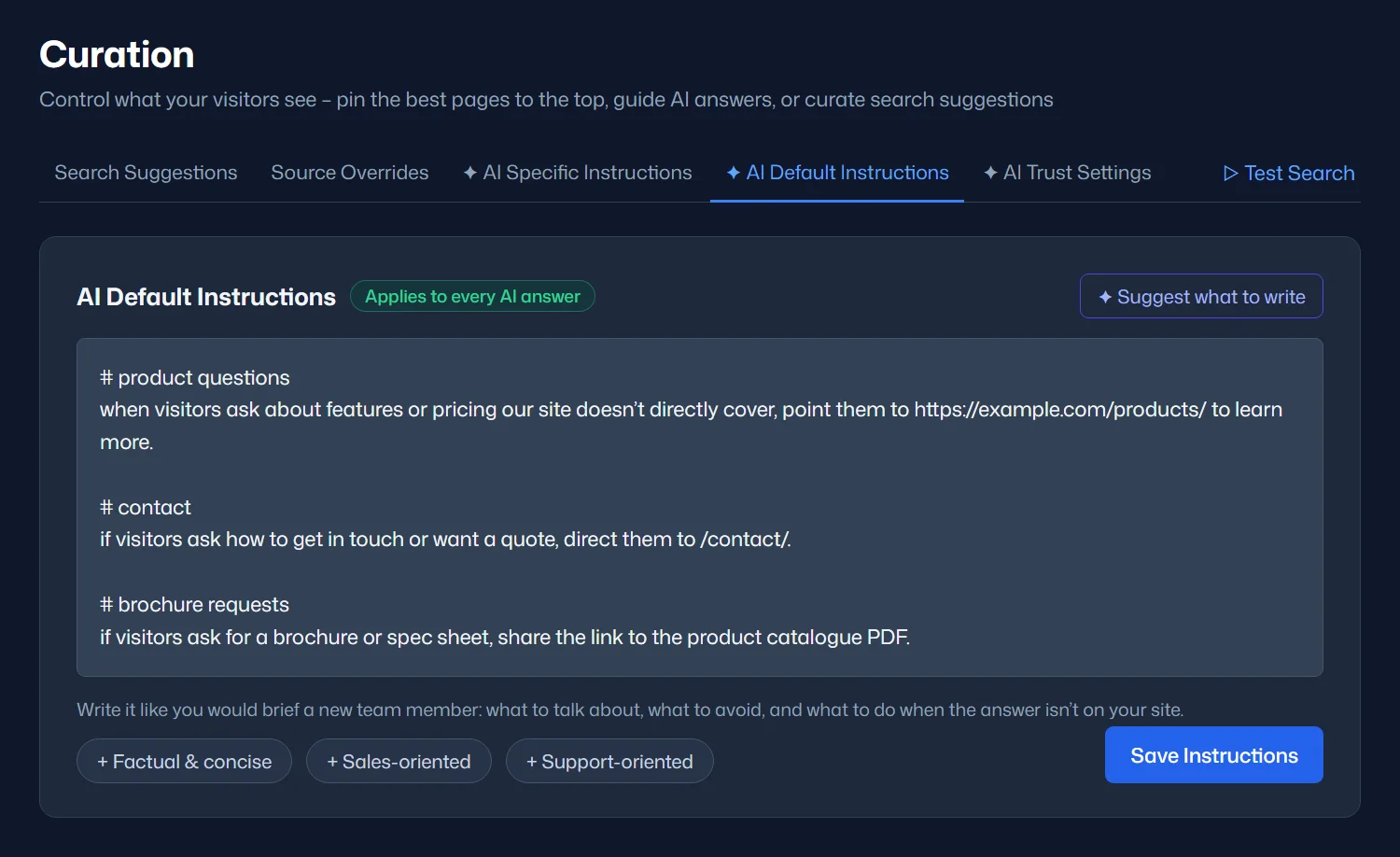
Tracking tells you where the intent is. Instructions let you act on it directly. Beyond observing which questions visitors ask, Breezy lets you write plain-language instructions that shape what the AI does when it recognises a certain kind of question. They aren’t scripted responses, they’re direction: when someone asks about pricing or features the site doesn’t directly cover, point them to the product page; when someone asks for contact info, send them to the contact page; when someone asks for a brochure or spec sheet, serve the actual document.
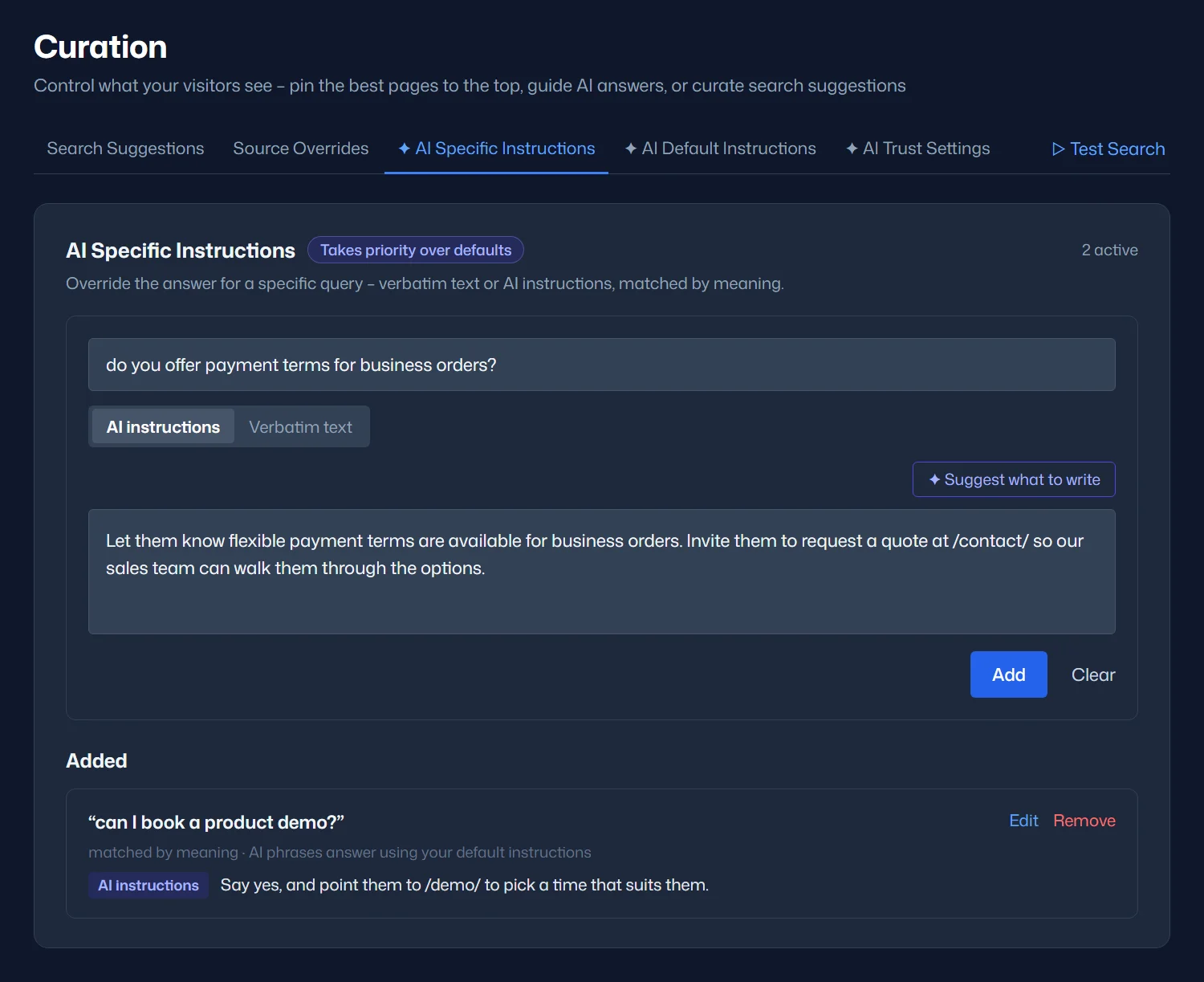
This is the direct version of the same idea the rest of this piece has been circling. Once you know where your highest-intent questions are, you don’t have to hope visitors find their own way from an answer to a next step. You write the next step into the instructions yourself. AI Default Instructions apply to every answer; for one high-value question, AI Specific Instructions let you set exactly how that question is answered. More on how instructions shape answers in Brand Voice & Custom AI Instructions.
Turn content gaps into answers
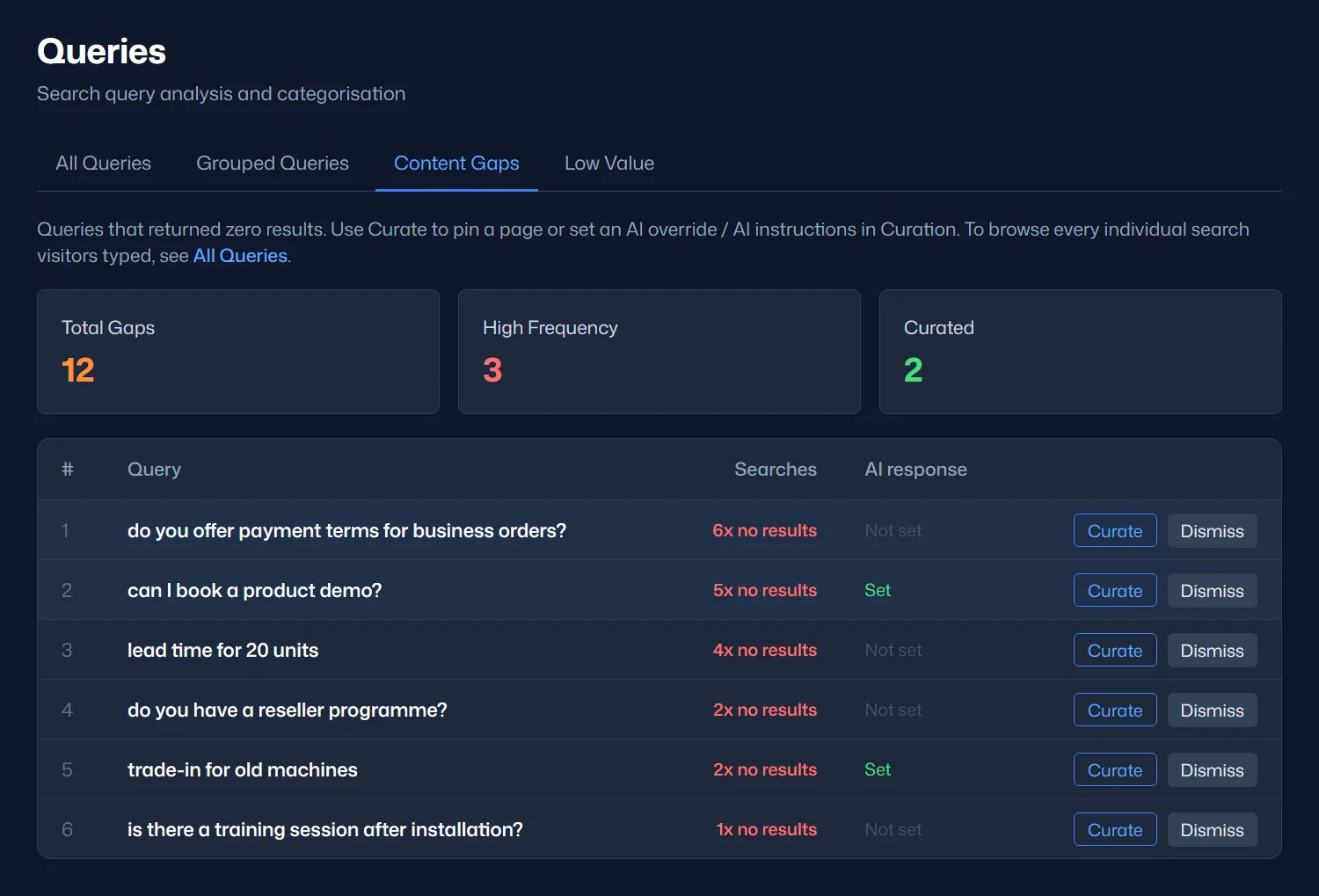
Content gaps are the questions visitors asked that your site couldn’t answer yet. They’re worth a regular look, because some of them come from buyers. A question about payment terms, lead times or booking a demo is a visitor one good answer away from getting in touch. There are two ways to close a gap, and they work best together.
Plan content for the gaps that keep coming back
When a gap is asked again and again, it deserves a proper answer on your site: a new page, a section on an existing page, or an FAQ entry. Once it’s published and your site is re-indexed, search answers it from your own content, and the new page works for your SEO as well.
Curate an answer straight away
For a gap you want handled today, click Curate. The question opens in Curation, already filled in, where you can write an AI Specific Instruction: plain-language guidance on how to reply the next time this question, or one that means the same thing, comes up. Point the visitor to the right page, invite them to request a quote, or tell them who to talk to. If an existing page already answers it, you can pin that page instead.
Curate now so visitors get a good answer from today, and plan the content that answers it properly for the long term. Dismiss the gaps that don’t matter to your business, like off-topic searches, so your list stays focused on the questions that do. For a fuller walkthrough of reviewing what visitors search for and improving your content from it, see What Your Website Visitors Can’t Find, and How to Fix It.
How we connected search to leads on our own site
When we ran this on our own site, we kept it simple, and anyone can copy it. We watched which query categories showed up repeatedly. Questions like “Do you provide website maintenance services?” and “How does your client support portal benefit me?” are commercial-intent questions, not casual browsing. Then we watched whether new enquiries arrived in the same window those questions were spiking. It’s correlation rather than proof, but it’s the same kind of correlation most marketing attribution runs on anyway. That’s how we counted 5 sales leads in 30 days against a previous average of 0–2 a month, by watching the overlap by hand. The full story, with the actual numbers, is in How Breezy AI Search Turned Website Visitors Into Sales Leads for WhooshPro.
A method you can run on your own site
- Check your Query Categories. Product Enquiry and Pricing are already separated out from general browsing, with no manual tagging required. Then scan your top questions and grouped topics for buying signals such as quote, brochure or contact requests.
- Watch click-through alongside category. When Product Enquiry and Pricing searches grow and the AI Answer and Sources click-through in Statistics holds up, visitors aren’t just asking, they’re following the answer to the next page.
- Write instructions for your highest-intent questions. Once you know where the commercial intent is, point those answers toward a next step: a product page, a contact form, a document. Use AI Specific Instructions for the one or two questions that matter most.
- Work through your content gaps. Curate the buyer questions straight away with an AI Specific Instruction, and add the ones that keep coming back to your content plan.
- Watch for timing overlap between spikes in those categories and new enquiries arriving by email, phone or chat.
- Ask new leads directly how they found their answer. It’s still the simplest, most underused method of all.
None of this requires new tooling. It requires treating your search data as a signal worth checking regularly, the same way you’d check analytics or ad performance.
Putting it together
Search volume and answered rate tell you whether visitors are finding what they need. Query categories and click-through tell you where the intent is and whether visitors are acting on it. Curated instructions let you act on that intent directly instead of hoping visitors find their own way, and content gaps show you which questions to answer next. Together, they show you whether AI search is working for your site, and where to point it next.