Find Answers Inside the PDFs on Your Website
 Breezy Team ·Oct 3, 2026 ·3 MIN READ
 TL;DR: Breezy AI Search makes the PDFs on your website searchable. Visitors find answers inside your brochures, guides, spec sheets and policies right alongside your web pages, and each PDF result is clearly marked and opens in a new tab.
Why the answer is so often in a PDF
On many websites the most useful content lives in a document. The spec sheet that settles a buying decision. The policy that answers a customer’s question. The guide that explains how something works. These are the pages visitors come looking for, and they are usually published as PDFs.
Search that only reads web pages can’t see any of it. A visitor types a clear question, gets nothing useful, and either leaves or writes to your team about something you already published. Making your PDFs searchable closes that gap.
Can Breezy AI Search find text inside PDFs?
Yes. Breezy AI Search reads the PDFs on your website and makes them searchable in the same search box as your pages. A visitor asks in their own words, and the best answers come back whether they live on a page or in a PDF.
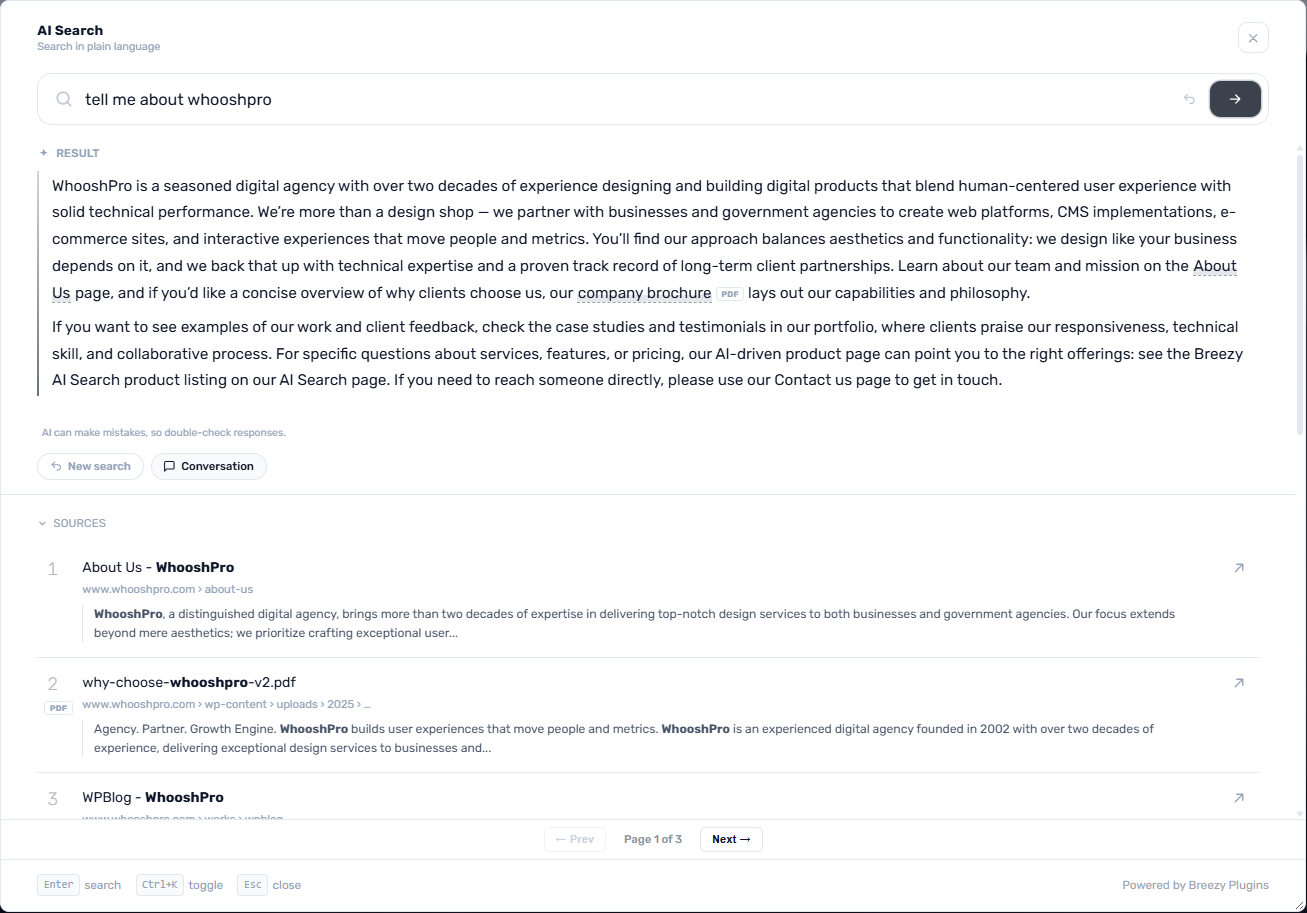
Results that are clearly marked
A PDF result carries a small PDF badge, so visitors know they are about to open a document. It opens in a new tab at the page where the matching passage begins.
AI answers that cite the PDF
When the best answer comes from a PDF, the AI answer draws on it and links back to that PDF, with the same PDF badge, so the visitor can check the source. Like every Breezy answer, it points to where it came from. We explain how that works in How AI Search Works: From Semantic Indexing to RAG.
Nothing to upload
There is no separate document library to build and nothing to re-upload when a file changes. Breezy finds PDFs the same way it finds your pages, by following the links on your site, and keeps them up to date as it revisits.
Results that stay on topic
Documents carry headers, footers and page numbers that repeat from page to page. Breezy leaves that repeated text out, so results show the content that answers the question.
You stay in control
PDF search is on by default for each site, and you can switch it on or off whenever you like under Search → Pages → Settings, with Index PDF documents. Turn it off and the PDFs leave your search results straight away.
Where it helps most
Anywhere visitors ask questions that a document already answers:
| A visitor asks | Where the answer lives |
|---|---|
| “What does the warranty cover?” | A warranty or policy PDF |
| “What are the dimensions of this model?” | A product spec sheet |
| “How do I set this up?” | A user guide or manual |
| “How do refunds work?” | A terms or policy document |
| “What is included in each package?” | A brochure or price list |
In each case the visitor asks the way they would ask a person, and gets the answer along with the document it came from.